Get lesson reminders
Class Spot reminds you about upcoming lessons in two ways: a notification right in the cabinet, and messages from the Telegram bot. Here's how to make sure you (and your students) never miss a start time.
In the cabinet: the countdown notification
If you're anywhere in your cabinet shortly before a scheduled lesson, a notification appears in the corner: the lesson name and a live countdown — "Your lesson starts in …" — with two buttons: Dismiss and Join Now. Click Join Now to go straight into the room.
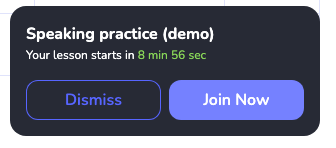
Nothing to set up — it works out of the box whenever you have a lesson coming up.
In Telegram: connect the bot
Telegram reminders reach you even when the cabinet is closed.
- Click your avatar in the top-right and open Notifications (or follow the "Telegram notifications" prompt that appears after you schedule a lesson).
- In "Connect bot for notifications", click the +. A chat with the bot opens in Telegram.
- Press Start in that chat. Back in the cabinet, the status changes to Connected.
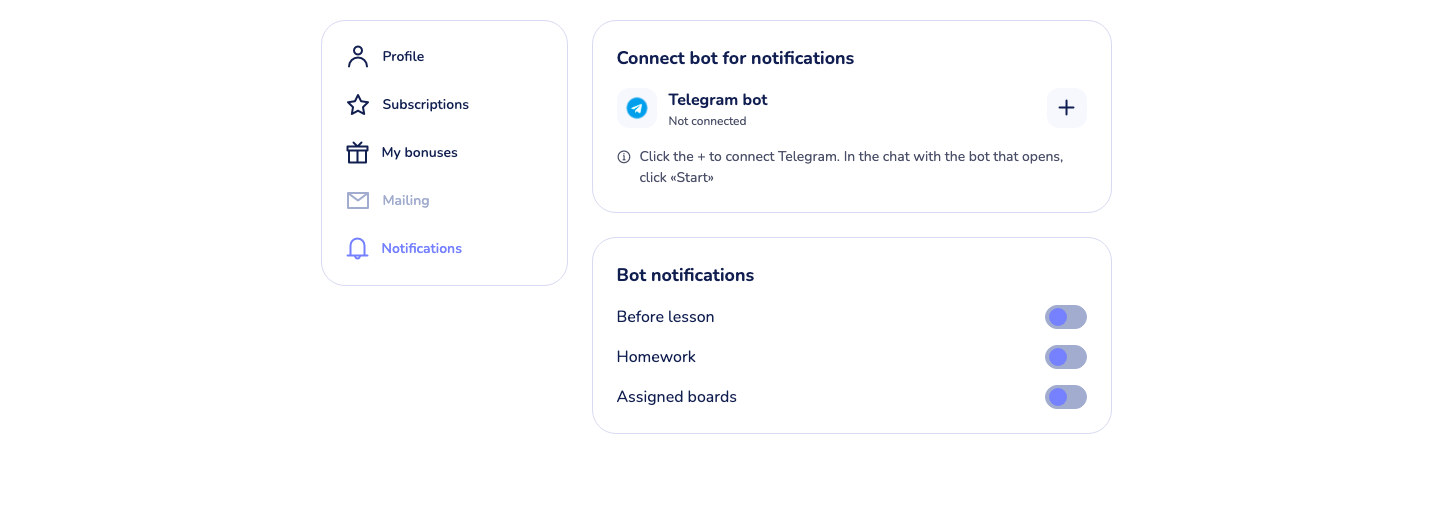
Once connected, choose what the bot sends you under Bot notifications:
- Before lesson — the main reminder; pick how many minutes before the start it should arrive.
- Homework — homework activity.
- Assigned boards — when boards are assigned.
Tips
- Give it half an hour. The system prepares reminder messages in advance — after connecting the bot, the first notifications arrive after about 30 minutes, not instantly.
- Students can connect the bot too. Anyone with a Class Spot account can link Telegram the same way and get their own "before lesson" reminders — worth suggesting to students who are often late.
- Bot notifications are a subscription feature. If the toggles are locked, the settings page will say notifications are unavailable without an active subscription.
What to do if it doesn't work
The bot is connected but nothing arrives. Check the Before lesson toggle is on and the lesson is actually in your Schedule — reminders are sent only for scheduled events. Also remember the ~30-minute warm-up after first connecting.
The in-app notification doesn't appear. It shows only while the cabinet is open in your browser and only shortly before the scheduled start. For anything earlier or away from the computer, use the Telegram bot.
I disconnected Telegram by mistake. Open Notifications in your profile and connect again — the same flow, no data lost.
If nothing above helps
Contact us:
- In-product chat — click the green chat bubble in the bottom-right of your cabinet, then Start Conversation.
- Email — info@classpot.com.